Path2D
The
Path2Dclass allows you to create paths independent of a given Canvas or graphics context. These paths can be modified over time and drawn repeatedly (potentially on multiple canvases).Path2Dobjects can also be used as lineDashMarkers or as the repeating pattern in a CanvasTexture.
Creating Path2D objects
Its constructor can be called without any arguments to create a new, empty path object. It can also accept a string using SVG syntax or a reference to an existing Path2D object (which it will return a clone of):
// three identical (but independent) paths
let p1 = new Path2D("M 10,10 h 100 v 100 h -100 Z")
let p2 = new Path2D(p1)
let p3 = new Path2D()
p3.rect(10, 10, 100, 100)
Drawing paths
A canvas’s context always contains an implicit ‘current’ bézier path which is updated by commands like lineTo() and arcTo() and is drawn to the canvas by calling fill(), stroke(), or clip() without any arguments (aside from an optional winding rule). If you start creating a second path by calling beginPath() the context discards the prior path, forcing you to recreate it by hand if you need it again later.
The Path2D class allows you to create paths independent of the context to be drawn (and potentially reused) later on. You can render a Path2D by passing it as the first argument to fill(), stroke(), or clip(), optionally including a second argument specifying the winding rule.
For instance, both of these snippets draw the same black square:
// using the context's implicit path
ctx.beginPath()
ctx.rect(100, 100, 50, 50)
ctx.fill()

// using an independent Path2D object
let p = new Path2D()
p.rect(100, 100, 50, 50)
ctx.fill(p)
Properties
.bounds
In the browser, Path2D objects offer very little in the way of introspection—they are mostly-opaque recorders of drawing commands that can be ‘played back’ later on. Skia Canvas offers some additional transparency by allowing you to measure the total amount of space the lines will occupy (though you’ll need to account for the current lineWidth if you plan to draw the path with stroke()).
The .bounds property returns an object defining the minimal rectangle containing the path:
{top, left, bottom, right, width, height}
.contours
The sequence of drawing operations in a path can be grouped into one or more ‘contours’ (i.e., unbroken lines that may be either open or closed), where each moveTo() marks the beginning of a new contour. You can access each of these individually via the .contours property. It returns an array of single-contour Path2D objects, one for each of the contours in the path.
.d
Contains a string describing the path’s edges using SVG syntax. This property is both readable and writable (and can be appended to using the += operator).
.edges
Returns an array containing each path segment that has been added to the path so far. Each element of the list is an array of the form ["verb", ...points], mirroring the calling conventions of both Path2D and the rendering context. As a result, the edges may be used to ‘replay’ a sequence of commands such as:
let original = new Path2D()
// ... add some contours to the path

// apply the original path’s edges to a new Path2D
let clone = new Path2D()
for (const [verb, ...pts] of original.edges){
  clone[verb](...pts)
}

// or use the original path’s edges to draw directly to the context
for (const [verb, ...pts] of original.edges){
  ctx[verb](...pts)
}
The array is not a verbatim transcript of the drawing commands that have been called since some commands (e.g., arc()) will be converted into an equivalent sequence of bézier curves. The full range of verbs and numbers of point arguments is as follows:
[
  ["moveTo", x, y],
  ["lineTo", x, y],
  ["quadraticCurveTo", cpx, cpy, x, y],
  ["bezierCurveTo", cp1x, cp1y, cp2x, cp2y, x, y],
  ["conicCurveTo", cpx, cpy, x, y, weight],
  ["closePath"]
]
.length
Returns the total length of the line(s) drawn by the path. It measures the distance along each of its contours, tracing curves rather than jumping straight from vertex to vertex. If the path contains multiple contours, length is the sum of their individual lengths.
The measurements are in ‘path units’, using the native coordinates from each of the line-drawing commands. The slice(), points(), jitter(), positionAt(), tangentAt(), and normalAt() methods accept arguments in the same units, so you may find length useful as a denominator when calling them.
Methods
contains()
contains(x, y)
booleanReturns true if the point (x, y) is either inside the path or intersects one of its contours.
complement(), difference(), intersect(), union(), xor()
complement(path)
difference(path)
intersect(path)
union(path)
xor(path)
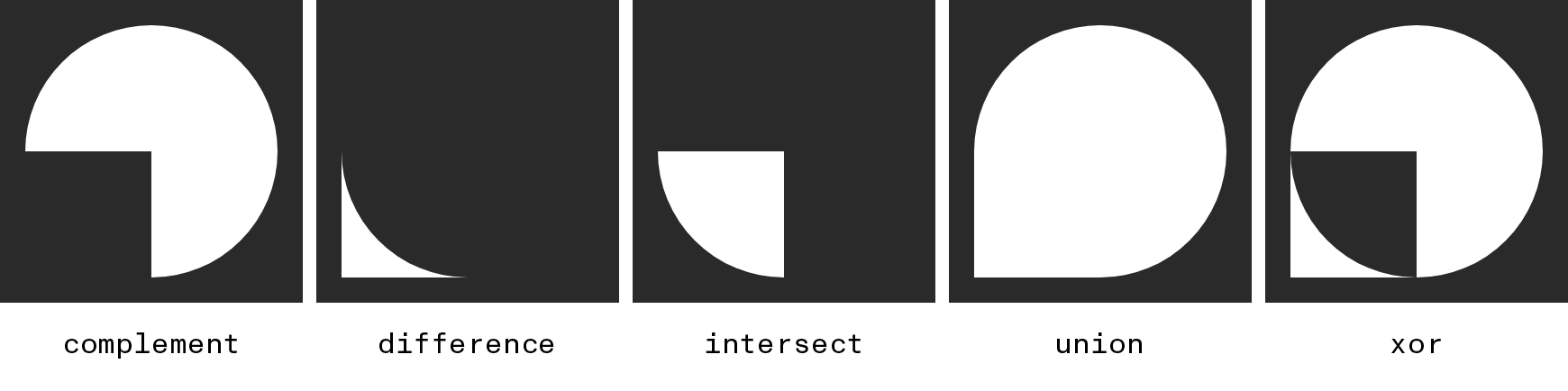
Path2DIn addition to creating Path2D objects through the constructor, you can use pairs of existing paths in combination to generate new paths based on their degree of overlap. Based on the method you choose, a different boolean relationship will be used to construct the new path. In all the following examples we’ll be starting off with a pair of overlapping shapes:
let oval = new Path2D()
oval.arc(100, 100, 100, 0, 2*Math.PI)

let rect = new Path2D()
rect.rect(0, 100, 100, 100)

We can then create a new path by using one of the boolean operations such as:
let knockout = rect.complement(oval),
    overlap = rect.intersect(oval),
    footprint = rect.union(oval),
    ...
interpolate()
interpolate(otherPath, weight)
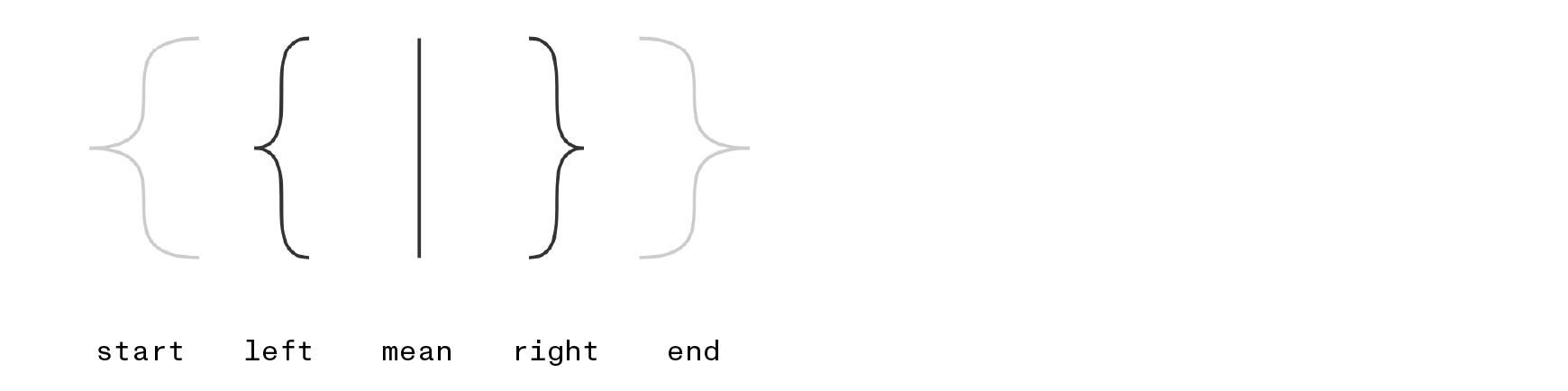
Path2DWhen two similar paths share the same sequence of ‘verbs’ and differ only in the point arguments passed to them, the interpolate() method can combine them in different proportions to create a new path. The weight argument controls whether the resulting path resembles the original (at 0.0), the otherPath (at 1.0), or something in between.
let start = new Path2D()
start.moveTo(-200, 100)
start.bezierCurveTo(-300, 100, -200, 200, -300, 200)
start.bezierCurveTo(-200, 200, -300, 300, -200, 300)

let end = new Path2D()
end.moveTo(200, 100)
end.bezierCurveTo(300, 100, 200, 200, 300, 200)
end.bezierCurveTo(200, 200, 300, 300, 200, 300)

let left = start.interpolate(end, .25),
    mean = start.interpolate(end, .5),
    right = start.interpolate(end, .75)
jitter()
jitter(segmentLength, amount, seed=0)
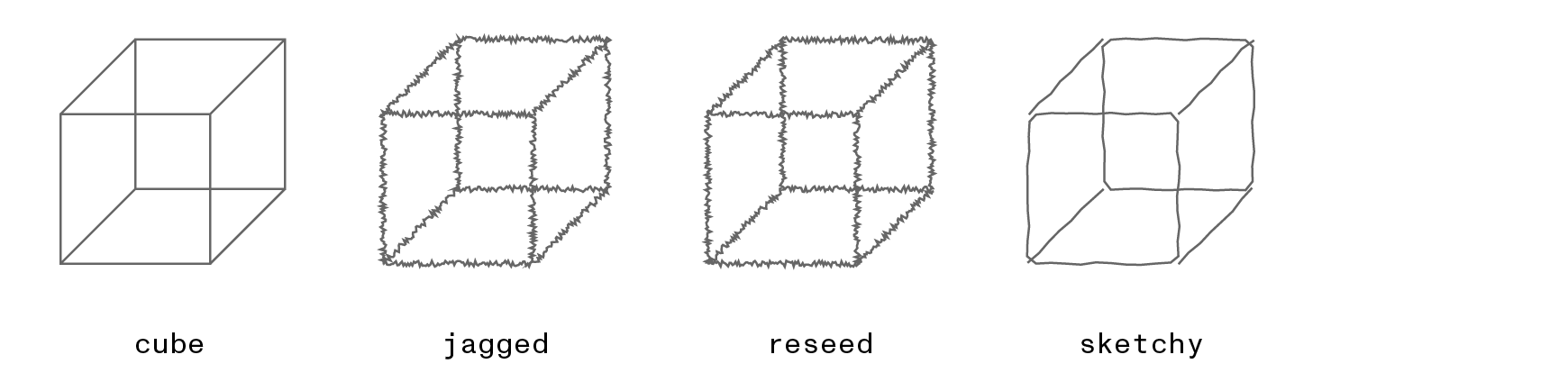
Path2DThe jitter() method will return a new Path2D object obtained by breaking the original path into segments of a given length then applying random offsets to the resulting points. Though the modifications are random, they will be consistent between runs based on the specified seed. Try passing different integer values for the seed until you get results that you like.
let cube = new Path2D()
cube.rect(100, 100, 100, 100)
cube.rect(150, 50, 100, 100)
cube.moveTo(100, 100)
cube.lineTo(150, 50)
cube.moveTo(200, 100)
cube.lineTo(250, 50)
cube.moveTo(200, 200)
cube.lineTo(250, 150)

let jagged = cube.jitter(1, 2),
    reseed = cube.jitter(1, 2, 1337),
    sketchy = cube.jitter(10, 1)
offset()
offset(dx, dy)
Path2DReturns a copy of the path whose points have been shifted horizontally by dx and vertically by dy.
points()
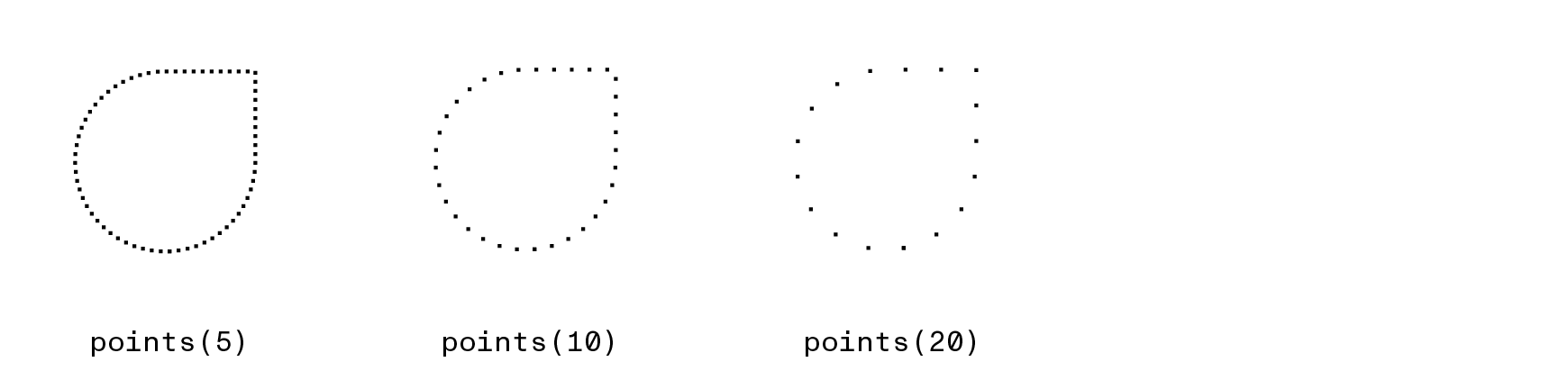
points(step=1, mode="even")
[[x1, y1], [x2,y2], ...]The points() method breaks a path into evenly-sized steps and returns the (x, y) positions of the resulting vertices. The step argument specifies the desired amount of distance between neighboring points and defaults to 1 px if omitted. If step doesn’t divide evenly into the contour length, it will be expanded/contracted as needed to fit the contour. You can disable this fitting by passing "exact" as the mode arg, in which case the distance between points will be precisely the step length (but beware: the final points in closed contours may look uneven, and there’s no guarantee the endpoint of a contour will be included).
let path = new Path2D()
path.arc(100, 100, 50, 0, 2*Math.PI)
path.rect(100, 50, 50, 50)
path = path.simplify()

for (const [x, y] of path.points(10)){
  ctx.fillRect(x, y, 3, 3)
}
positionAt()
positionAt(distance)
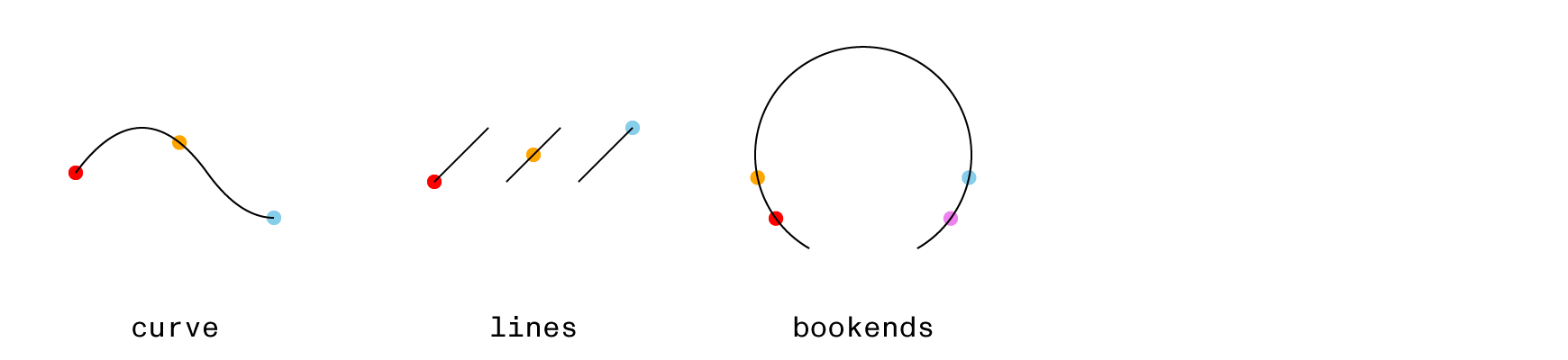
{x:Number, y:Number} | nullThe positionAt() method takes a distance (in path units) and returns an x/y coordinate pair locating the corresponding point on the path. Positive distance values are measured relative to the path’s start and negative relative to its end.
function dotAtLocation(path, distance, color){
  let {x, y} = path.positionAt(distance)
  ctx.fillStyle = color
  ctx.beginPath()
  ctx.arc(x, y, 4, 0, 2*Math.PI)
  ctx.fill()
}

let curve = new Path2D("M 20 85 Q 57 35 93 85 Q 111 110 130 110")
dotAtLocation(curve, 0.0 * curve.length, 'red')
dotAtLocation(curve, 0.5 * curve.length, 'orange')
dotAtLocation(curve, 1.0 * curve.length, 'skyblue')
ctx.stroke(curve)
ctx.translate(150, 0)

let lines = new Path2D("M 20 90 L 50 60 M 60 90 L 90 60 M 100 90 L 130 60")
dotAtLocation(lines, 0.0 * lines.length, 'red')
dotAtLocation(lines, 0.5 * lines.length, 'orange')
dotAtLocation(lines, 1.0 * lines.length, 'skyblue')
ctx.stroke(lines)
ctx.translate(150, 0)

let bookends = new Path2D("M 45 127 A 60 60 0 1 1 105 127")
dotAtLocation(bookends,  25, 'red')
dotAtLocation(bookends,  50, 'orange')
dotAtLocation(bookends, -50, 'skyblue')
dotAtLocation(bookends, -25, 'violet')
ctx.stroke(bookends)
tangentAt() & normalAt()
tangentAt(distance)
normalAt(distance)
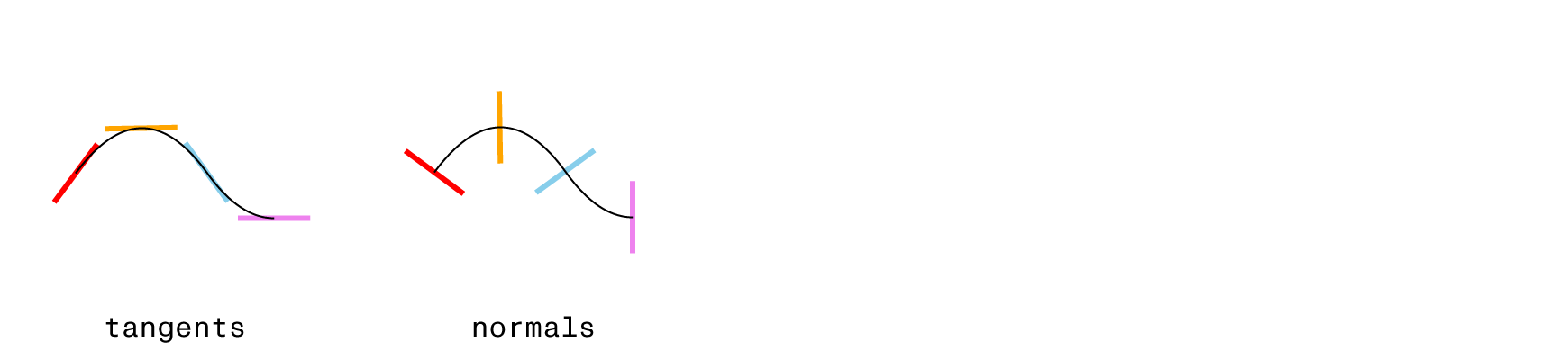
Number | nullThe tangentAt() method complements positionAt() by returning the angle of the path’s curve at a distance measured in path units. Positive distances are measured from the beginning of the path and negative distances from its end. The tangent angle is returned in radians and can be passed directly to rotate() to align with the path’s curve (see below). The normalAt() convenience method returns an angle that is perpendicular to the tangent and will always be on the ‘left hand’ side of the curve being followed.
let path = new Path2D("M 20 85 Q 57 35 93 85 Q 111 110 130 110")

function lineAtLocation(angleType, distance, color){
  let point = path.positionAt(distance)
  let angle = angleType=="tangent" ? path.tangentAt(distance) : path.normalAt(distance)
  ctx.save()
  ctx.strokeStyle = color
  ctx.lineWidth = 3
  ctx.translate(point.x, point.y)
  ctx.rotate(angle)
  ctx.stroke(new Path2D("M-20 0 h 40"))
  ctx.restore()
}

lineAtLocation("tangent", 0, 'red')
lineAtLocation("tangent", 0.33 * path.length, 'orange')
lineAtLocation("tangent", 0.66 * path.length, 'skyblue')
lineAtLocation("tangent", path.length, 'violet')
ctx.stroke(path)
ctx.translate(150, 0)

lineAtLocation("normal", 0, 'red')
lineAtLocation("normal", 0.33 * path.length, 'orange')
lineAtLocation("normal", 0.66 * path.length, 'skyblue')
lineAtLocation("normal", path.length, 'violet')
ctx.stroke(path)
round()
round(radius)
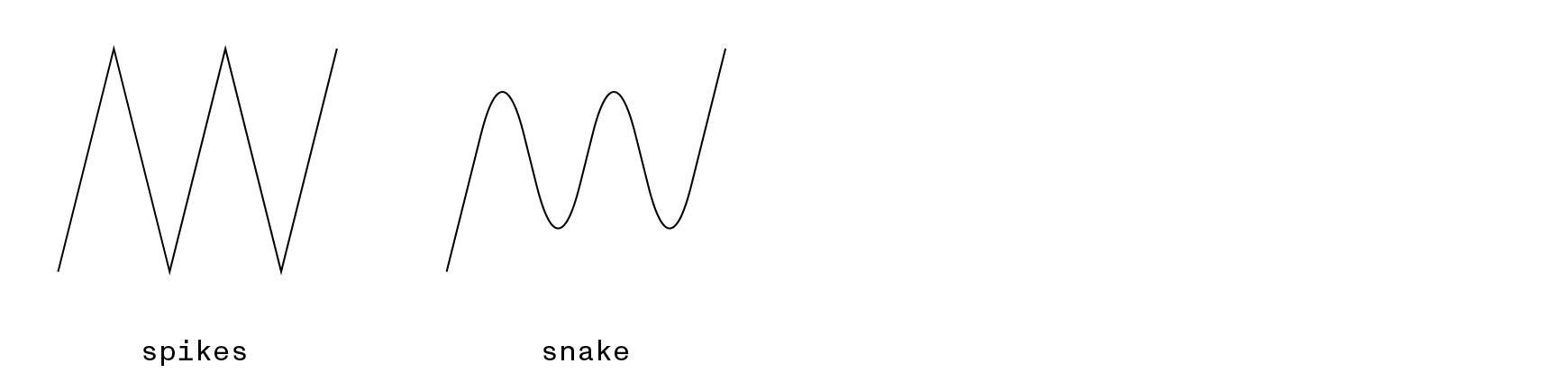
Path2DCalling round() will return a new Path2D derived from the original path whose corners have been rounded off to the specified radius.
let spikes = new Path2D()
spikes.moveTo(50, 225)
spikes.lineTo(100, 25)
spikes.lineTo(150, 225)
spikes.lineTo(200, 25)
spikes.lineTo(250, 225)
spikes.lineTo(300, 25)

let snake = spikes.round(80)
simplify()
simplify(rule="nonzero")
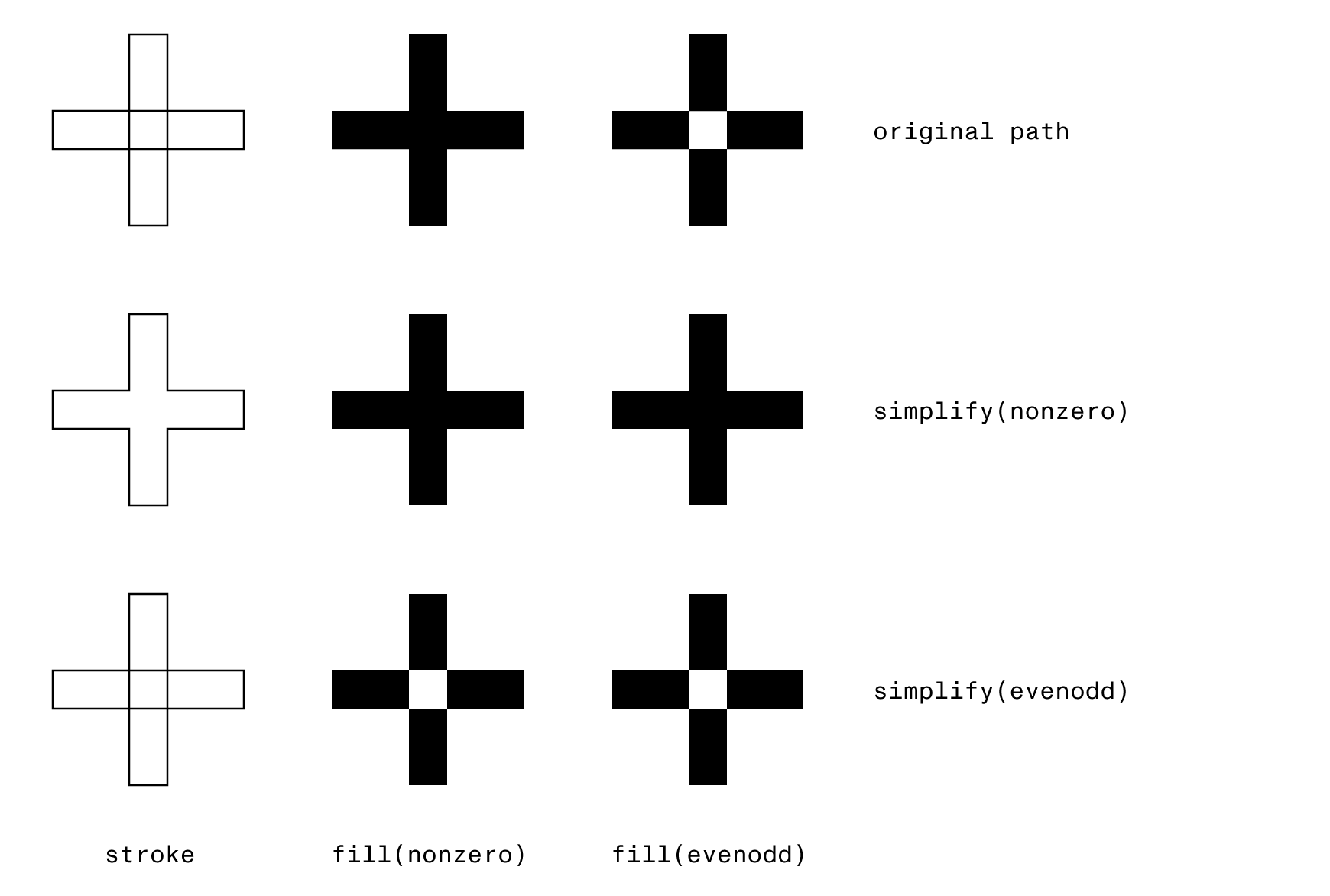
Path2DPaths that contain multiple contours use a ‘winding rule’ to decide whether overlapping regions should be filled or ‘knocked out’. You can make this decision at draw-time by passing a rule argument to ctx.fill() (either evenodd or the default: nonzero). The simplify() method lets you make this decision ahead of time by constructing a new Path2D that has had all of its overlapping regions removed (so there’s no ambiguity to be resolved when drawn).
In this context ‘simplify’ refers only to the shape’s structure, not its level of detail: the method removes crossings rather than reducing the number of points. In fact, splitting an intersection into separate contours frequently increases both the contour and point counts.
When called with the default nonzero rule, any contours whose points wind in the same direction (i.e., both clockwise or both counter-clockwise) will be flattened into un-layered contours enclosing them all. Contours that wind in opposing directions will create a hole.
Alternatively, the evenodd rule will create holes in all the regions where an even number of contours are layered atop one another (similar to the xor() operation), regardless of the clockwise-ness of the points.
Since the simplified path contains no overlaps, it will render identically whichever winding rule is passed to fill():
let original = new Path2D(`
  M 10,50 h 100 v 20 h -100 Z
  M 50,10 h 20 v 100 h -20 Z
`)

let merged = original.simplify(), // nonzero
    hollow = original.simplify('evenodd')

ctx.stroke(original)
ctx.translate(150, 0)
ctx.fill(original)
ctx.translate(150, 0)
ctx.fill(original, "evenodd")
transform()
transform(...matrix)
Path2DReturns a new copy of the path whose points have been modified by the specified transform matrix. The matrix can be passed as a DOMMatrix object, a CSS transform string (e.g., "rotate(20deg)"), or 6 individual numbers (see the Context’s setTransform() documentation for details). The original path remains unmodified.
slice()
slice(start, end, inverted=false) // copy between the start & end positions (or their complement)
slice(start) // copy from the starting position to the end of the path
slice() // clone the full path
Path2DThe slice() method is analogous to the Array method of the same name: it allows you to create a new path that contains a subset of the points in the original. The start and end arguments correspond to distances along the path and their magnitude can range from 0 to the path’s length. Positive values measure from the path’s initial point and negative values from its final point. If the inverted argument is set to true, the new path will contain everything from the original except the region between the specified endpoints.
Passing a single number (either positive or negative) sets the starting position and selects the region from there to the end of the path.
let orig = new Path2D()
orig.arc(100, 100, 50, Math.PI, 0)

let len = orig.length

let middle = orig.slice(.25*len, .75*len),
    endpoints = orig.slice(.25*len, .75*len, true),
    left = orig.slice(.25*len),
    right = orig.slice(-.25*len)

trim()
trim(start, end, inverted=false)
trim(keep, inverted=false)
Path2DThe trim() method returns a new Path2D which contains only a portion of the original path. The start and end arguments specify proportions of the original length as numbers between 0 and 1.0. If both arguments are provided, the new path will be a continuous contour connecting those endpoints. If the inverted argument is set to true, the new path will contain everything from the original except the region between the specified endpoints.
Passing a single number specifies the proportion of the path to ‘keep’, starting from the beginning for positive numbers or the end for negative numbers. In either case, you can include inverted as the second argument to flip the selected region.
let orig = new Path2D()
orig.arc(100, 100, 50, Math.PI, 0)

let middle = orig.trim(.25, .75),
    endpoints = orig.trim(.25, .75, true),
    left = orig.trim(.25),
    right = orig.trim(-.25)

unwind()
unwind()unwind()
Path2DThe unwind() method has been deprecated and will be removed in a future release. You should now use simplify('evenodd') to convert evenodd paths to a form that can be filled using the default nonzero winding rule instead.
Previously the main use for unwind() was dealing with the values returned by difference(), xor(), and the other boolean operations (all of which returned paths that expected to be filled with an evenodd rule). As of version 4, those methods all return pre-simplified paths that will render correctly using the default nonzero winding rule.